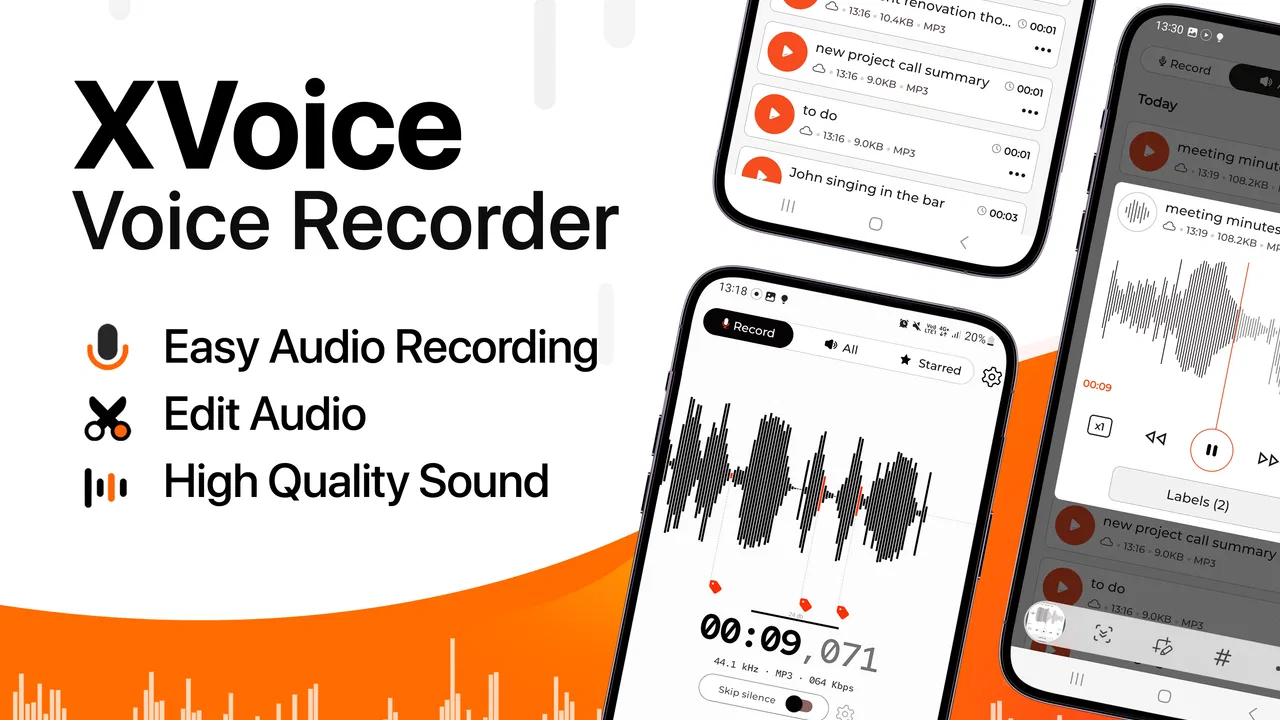
Voice Recorder - XVoice
- 4.3
- Rating
- 1.00M
- Installs
- Free
- Price

 Analysis by App-foxy
I approached Voice Recorder - XVoice as a practical audio tool rather than a feature checklist. Its purpose is easy to understand: capture meetings, voice memos, interviews, and recordings after calls from an Android phone. In everyday use, that makes it appealing to students, journalists, remote workers, and anyone who wants a quick way to keep spoken information instead of relying on memory. The app is free to install, although optional purchases range from $2.99 to $39.99 per item, so I would pay attention to what is included before buying anything.
What stood out to me is that the app is most useful when it removes a small but repeated annoyance. I can imagine opening it before a short interview, leaving it ready during a meeting, or using it to save a personal reminder while walking. It is not trying to replace a full studio recorder. Its value is convenience, especially for people who want a straightforward recording companion on a phone running Android 10 or newer.
Where recording apps usually get stuck
The first difficulty is rarely the recording button itself. The real friction usually appears around timing. If I remember to record only after a conversation has started, I may already have missed the important opening. A good habit with XVoice is to prepare the app before the meeting, interview, or phone conversation begins. That simple change matters more than searching through advanced settings at the last moment.
You May Also Like

 Blood Strike: 2.5 Anniversary
Blood Strike’s Loadouts Turn Every Drop Into a Tactical Gamble
A close look at Blood Strike’s custom loadouts: how fast access to signature weapons reshapes its battle royale rhythm, rewards preparation, and narrows the gap between fights.

 Pandora - Music & Podcasts
Pandora’s Music Is Easy to Start, but Harder to Recover
Pandora’s strength is its low-effort path from a seed to a station. Its weak spot is how much confidence it asks you to place in connection, setup, and quiet recovery.

 8 Ball Pool
 Is Built on Rivalries, Rematches, and Routine
A close look at the rivalries, rematches, shared routines, and unanswered safety questions that turn a quick pool match into a persistent mobile community.

 Samsung Music
’s Quiet Strength Is Playing What You Already Own
Its reach comes less from spectacle than from dependable access to a personal library. That simplicity is both the app’s strongest retention engine and its ceiling.

 AccuWeather: Weather Radar
AccuWeather Review: A Quick, Clear Forecast for Everyday Decisions
For everyday plans, the best forecast is the one you can understand quickly. AccuWeather makes rain timing, radar, and local conditions easy to act on, with a few trade-offs.

 Hill Climb Racing
Why Hill Climb Racing Still Turns Crashes Into One More Run
A tiny car, a bumpy hill and one more upgrade: Hill Climb Racing keeps resurfacing because its simple chaos makes every near-miss feel personal.
More From Our News Desk
View All News


Another common stumbling block is assuming that a recording has been saved just because the microphone appeared to be active. I would always stop the recording deliberately and look for the finished item inside the app before leaving the screen. That gives me a chance to notice a failed save, an unexpected title, or a recording that is much shorter than intended. It is a small check, but it prevents the unpleasant discovery that an important conversation was never stored properly.
The app’s broad purpose also creates a question: is it mainly for voice notes, or can it handle longer conversations? I see it as flexible enough for both kinds of use, but the workflow should match the situation. A quick memo can be recorded and checked immediately. A meeting or interview needs more preparation, a stable phone position, and enough available storage. Treating every recording as if it were a disposable note is where avoidable mistakes begin.
Call recording deserves extra care. A phone call can involve different device behavior, network conditions, and legal expectations from an ordinary microphone memo. I would not assume that a recording after a call will always behave exactly like a voice note made in a quiet room. Before relying on it for something important, I would make a short test call, play the result back, and confirm that both sides are understandable. I would also tell the other person when recording a conversation is required or appropriate in the place where I am using it.
Why the first test should be boring
My preferred first test is deliberately uninteresting: a short spoken sentence in a quiet room, followed by playback. This confirms that the app starts, stops, and saves a usable file without adding the pressure of a real meeting. I would then repeat the test from the place where I expect to use it, because a phone on a desk can behave differently from a phone in a pocket or across a room.
For interviews, I would make a second test with the phone placed at the intended distance from both speakers. This is more useful than testing only with the microphone close to my mouth. Distance, room echo, background conversation, and the direction of the phone can all change the result. XVoice can provide the recording workflow, but it cannot turn a distant or covered microphone into a close one.
Setup checks that prevent avoidable failures
Before using Voice Recorder - XVoice for anything that matters, I would check four practical points: the phone’s operating system, available storage, battery level, and whether the app can access the microphone when needed. The minimum supported system is Android 10, which is helpful because it sets a clear starting point for compatibility. If the phone is older than that requirement, troubleshooting the app itself is unlikely to solve the problem.
Storage is easy to overlook because a short voice memo feels tiny. Longer interviews and repeated meeting recordings are different. I would leave comfortable free space rather than begin with a nearly full phone. I would also avoid recording while the phone is overloaded with unrelated tasks. Closing apps that are actively using audio or consuming heavy resources can make the session easier to manage, even though it does not guarantee perfect results.
Battery planning matters most for long sessions. I would start with a reasonable charge, keep the phone somewhere it will not be accidentally bumped, and avoid placing it under clothing or inside a closed bag. If the phone becomes hot, the battery drops quickly, or the system starts restricting background activity, the recording session deserves attention rather than blind confidence.
Notifications are another practical distraction. A call, alarm, or message can interrupt concentration even when it does not completely stop a recording. For a formal interview or meeting, I would use the phone’s available quiet or focus controls and tell nearby people that the device is being used as a recorder. This is not an XVoice-specific trick; it is simply good phone hygiene when the recording is more important than incoming alerts.
I would also create a naming routine. If the app allows me to identify recordings after they are made, I would use a consistent pattern based on the subject and day, rather than leaving a collection of vague files to sort through later. For example, a meeting note can be renamed immediately after stopping, while the details are still fresh. This is one of the most useful habits for anyone who records often, because finding the right audio later can take longer than making it.
Use the app before the important moment
For a meeting, I would open XVoice several minutes early, make the short test, and keep the phone positioned where voices are likely to reach it. For a voice memo, I would record the thought in one complete sentence instead of starting and stopping repeatedly. For an interview, I would agree on the recording first, begin with a clear spoken marker, and then keep the phone still. These steps reduce confusion when I review the audio later.
That spoken marker is a surprisingly useful workflow detail. Saying the subject, date, or interviewee’s name at the beginning makes a recording easier to identify during playback, especially if several files have similar names. It also gives me a quick confirmation that the microphone is receiving speech. I would not use sensitive personal information in the marker, but a simple subject label can save time.
Because the app is rated for Everyone, it is approachable for a wide range of users, including families and students. That age rating does not remove the need for responsible recording. Children should understand when recording another person is acceptable, and adults should remember that meetings, classrooms, workplaces, and calls may have their own consent expectations. The app makes capture convenient; the user remains responsible for how that convenience is used.
Recovering a workflow when something goes wrong
If a recording seems missing, I would not immediately record over the problem or uninstall the app. First I would return to the app’s recording area, refresh my view if necessary, and check whether the item was saved under an unexpected name. I would then play it from the beginning and near the end. Sometimes the file exists but the first impression is misleading because the recording was stopped earlier than expected.
If the recording is silent, I would repeat the short room test rather than assume the important session can be repaired. I would check that the phone’s microphone opening is not covered by a case, hand, or fabric, and that another app is not actively using audio. A second test with the phone placed on a table can help separate a positioning problem from an app problem.
If the app does not start recording, I would close it, reopen it, and try a short test before changing anything more drastic. I would also check the phone’s microphone access controls and system restrictions. The exact menu names can vary by Android version and manufacturer, so I would look for the app’s permission and battery-related settings rather than follow a rigid path that may not match the phone.
When a long recording stops unexpectedly, I would think about the phone as a whole. Low storage, low battery, overheating, aggressive power management, or an accidental touch can all interrupt a session. The safest recovery plan is to test a shorter recording under the same conditions. If short tests work but long ones fail, I would divide a future meeting into sensible segments and save or review each segment during a natural break.
I would be cautious with clearing app data or reinstalling. Those actions may remove locally stored recordings, depending on how the phone handles the app’s files. Before attempting them, I would preserve any recordings that are still visible and make sure I know where they are stored or how I can access them. Reinstalling is a last resort, not the first troubleshooting step for an audio file that appears to be missing.
Playback is part of recording
My strongest practical recommendation is to treat playback as part of the capture process. After an interview, I would listen to a short section from the beginning, a middle section, and the ending. This does not require reviewing the whole conversation immediately. It simply confirms that the voices remain present and that the phone did not become covered or displaced during the session.
For a personal memo, playback also helps catch unclear thoughts. I can re-record a sentence while the idea is still available instead of discovering later that I spoke too softly or stopped halfway through. With meetings, the same check can reveal that the phone was placed too far away. The sooner I notice that, the more realistic my options are.
One trade-off is that a phone recorder is convenient precisely because it is small and unobtrusive, but that also makes positioning easy to neglect. A dedicated recorder may offer a more deliberate physical setup, while XVoice is faster to reach for. I would choose the app for speed and everyday capture, not because the phone automatically provides the best acoustics in every room.
When the app is not the cause
Many disappointing recordings are caused by the environment. A busy café, a large echoing room, an air conditioner, or several people speaking at once can overwhelm any simple voice recording setup. If the audio sounds distant or muddy, I would first move the phone closer to the speakers, place it on a stable surface, and reduce competing noise. Changing the room can help more than changing the app.
Phone hardware also matters. A blocked microphone opening, a damaged case, or a problem that affects other audio apps points away from XVoice. I would compare the result with a basic voice recording tool already on the phone. If both apps produce the same distorted or silent audio, the next step is checking the device rather than repeatedly reinstalling the recorder.
Calls are especially difficult to judge. The other person’s voice may depend on the phone model, call route, speaker mode, or system behavior. A recording that captures my voice clearly but not the other side does not automatically mean the app failed in the same way a silent memo would. I would test the exact call arrangement I plan to use and avoid promising myself that an important conversation is safe until that test succeeds.
There is also a privacy trade-off. A recorder that is easy to start is useful, but recordings can contain names, opinions, customer details, class discussions, or private family conversations. I would keep files organized, remove unnecessary recordings, and avoid sharing them casually. If the intended use involves confidential business material or sensitive interviews, I would compare XVoice with a service that offers the specific security, collaboration, or transcription controls required by that situation.
The developer is Glad Appvestor, and the app has reached more than a million installs with a 4.3 average from around 2.7 thousand ratings. Those figures suggest that it has found a substantial audience, but they should not replace a personal test on the exact phone and recording situation I care about. A popular recorder can still be the wrong fit for someone who needs advanced editing, automatic transcripts, multi-track production, or tightly managed team archives.
How it compares with the usual alternatives
Compared with the basic recorder that may already be installed on an Android phone, XVoice is attractive when its focus on meetings, memos, interviews, and after-call recording matches my routine. The advantage is not necessarily that every recording sounds better. It is that the app is aimed at several spoken-audio situations instead of only a quick personal note.
The built-in recorder may still be the better choice when I want the fewest moving parts, especially for a one-time memo. It is already familiar, usually quick to find, and less likely to require learning another workflow. I would choose XVoice when I expect to record regularly and want one dedicated place for spoken material, but I would not install it merely to replace an occasional reminder.
A dedicated field recorder is a stronger option for serious interviews, music, noisy locations, or work where microphone quality and physical controls matter. A transcription service is better when the main goal is searchable text rather than listening to audio. A meeting platform may be preferable for organized remote sessions with participants and shared notes. XVoice sits between these choices: more purposeful than a casual memo tool, but simpler than a full production or collaboration system.
The free entry point makes it easy to try the workflow before spending money. Since in-app purchases are available, I would examine each purchase screen carefully and decide whether the extra value matches my use. For me, the sensible approach is to prove that recording, playback, naming, and recovery work on my phone first. Paying before that test would solve neither a blocked microphone nor a poor room setup.
My practical verdict after using it as a daily recorder
Voice Recorder - XVoice is a sensible choice for people who want a focused way to capture spoken audio on a modern Android phone. I like it most for short interviews, meeting reminders, personal voice notes, and situations where reaching for a recorder is faster than writing. The app’s usefulness comes from a repeatable routine: prepare early, position the phone carefully, stop deliberately, and check playback before moving on.
I would skip it if I needed studio-style controls, dependable professional call archiving, automatic transcription, or a team system for managing confidential recordings. I would also avoid relying on it without testing if the audio is legally, academically, or professionally critical. In those cases, a dedicated recorder, a specialized call solution, or an approved workplace tool may be a better match.
For everyone else, the low-risk way to begin is simple. Install the free app, make a short test in a quiet room, repeat it where you normally work, and build a naming and playback habit. The current version is 6.6, and the app supports Android 10 and above, so compatibility is straightforward for many users. My final view is that Voice Recorder - XVoice is most valuable when preparation matters as much as the record button: it can make everyday audio capture convenient, but good results still depend on the phone, the room, and the way I use it.
FAQs for Voice Recorder - XVoice
01What is Voice Recorder - XVoice used for?
Voice Recorder - XVoice is designed for recording spoken audio, such as personal notes, lectures, interviews, meetings, ideas, and reminders. After testing the app, its main appeal is its straightforward recording workflow: open the recorder, start capturing sound, stop when finished, and manage the saved files from the app. It is best suited to everyday recordings rather than advanced studio production.
02Does Voice Recorder - XVoice provide good recording quality?
The recording quality depends on your phone’s microphone, the surrounding environment, and the available settings in the app. In a quiet room, XVoice can be useful for clear conversations, reminders, and voice notes. Background noise, wind, distance from the speaker, and low-quality hardware can still affect the result, so users should make a short test recording before capturing an important lecture or interview.
03Can I save, share, or manage recordings in Voice Recorder - XVoice?
Yes, the app is intended to let users review and manage recordings after they are created. Depending on the device and app version, available options may include renaming files, deleting unwanted recordings, and sharing audio through other installed applications. Before relying on it for important material, check where files are stored and confirm that your preferred sharing or backup method works correctly.
04Is Voice Recorder - XVoice free to download and use?
Voice Recorder - XVoice may be available as a free download, although the exact pricing model can vary by platform, region, and version. Some editions of recorder apps include advertisements, optional purchases, or premium features. We recommend checking the official Google Play Store or App Store listing before downloading to review current pricing, in-app purchases, supported devices, and any limitations applied to the free version.
05Is Voice Recorder - XVoice safe and suitable for recording private conversations?
As with any recording application, privacy depends on the permissions requested, how recordings are stored, and how you share the resulting files. Review XVoice’s permissions and privacy information before use, especially if recording sensitive material. You should also obtain permission where local laws require it before recording another person. Avoid sharing confidential audio through unsecured channels and keep important files backed up safely.
Pros
- Simple interface makes recording and playback easy for beginners.
- Quickly captures voice notes without requiring complicated setup.
- Useful for lectures
- meetings
- interviews
- and personal reminders.
- Lightweight design should consume little storage and system resources.
- Recordings can be reviewed immediately after finishing a session.
Cons
- Audio quality depends heavily on the phone’s built-in microphone.
- Background noise may reduce clarity in busy environments.
- Limited editing tools may disappoint users needing advanced controls.
- Long recordings can occupy considerable storage space over time.
- Some features may be restricted by device permissions or system settings.

Voice Recorder - XVoice
Gallery